
Radon Tunes for Apple Music
TrieFly LLCMusic & Audio
2.254.00 Reviews
- Version
- 2.6.0
- Installs
- 500.00K
- Age Rating
- Everyone
Screenshots
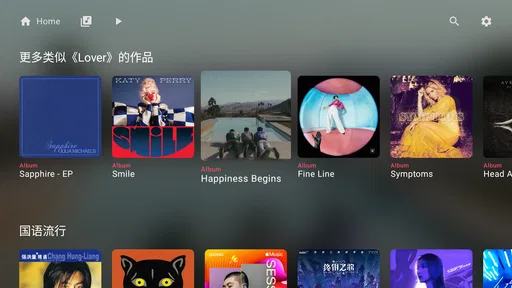
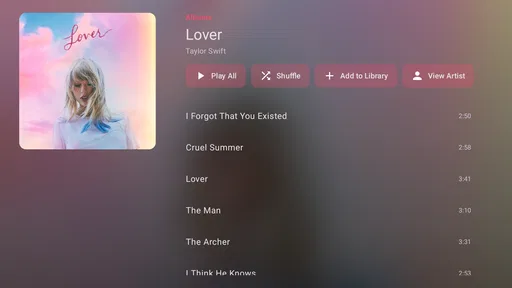
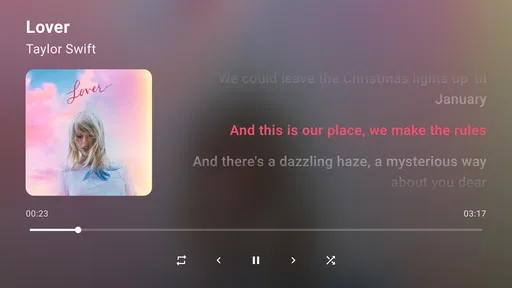
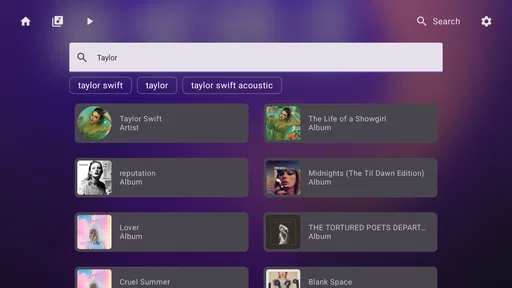
Our Review of Radon Tunes for Apple Music
 Analysis by Appyee
Radon Tunes is a free music and audio app from TrieFly LLC built around a simple idea: making music available on a television rather than keeping listening limited to a phone. I found that purpose easy to understand, but the experience is more specialized than the short store description suggests. It makes the most sense when your TV is already part of your daily listening setup and you want a straightforward way to enjoy music from a larger screen.
My overall view is mixed. The concept is useful, especially for casual background listening in a living room, but the low average rating of 2.2 from around 1.2 thousand ratings is an important warning for anyone expecting a polished, full-featured music service. I would treat this as a focused TV companion rather than a replacement for established music apps.
What Radon Tunes is trying to do
The app sits in the Music & Audio category and is listed as Radon Tunes. Its central appeal is not complicated playlist management or deep music discovery. Instead, it is the convenience of moving the listening experience to a television. That changes the way I judge it: the key question is not whether it can compete with every familiar phone-based music app, but whether it makes TV listening comfortable enough to justify installing another app.
In a typical home, music often starts on a phone and then gets interrupted by notifications, calls, or the need to use the device for something else. A TV-based option can solve that small but real problem. I can imagine starting music while cooking, cleaning, or having friends over, then leaving the phone aside. The screen is shared, the sound is easier for a room to hear, and the listening session feels less tied to one person’s handset.
That benefit is practical rather than dramatic. Radon Tunes does not need to transform how someone listens to music to be useful. It only needs to make a particular situation less awkward. In my experience, apps with this kind of narrow purpose work best when users understand that limitation from the beginning.
The app is free to install, with optional in-app purchases listed at $3.99 per item. That makes trying it relatively easy, although the possibility of paid items means I would still check what is available before building my regular listening routine around it. It is rated for Everyone, so its intended audience is broad, including households that want a simple music option on a shared screen.
The strongest reason to try it
The strongest argument for Radon Tunes is its living-room focus. Most phone music apps are designed around personal listening: earbuds, private playlists, and a screen held close to the user. A TV app changes the social setting. Music becomes something that can accompany a room instead of something one person controls quietly from a pocket.
That makes it a sensible choice for low-pressure moments. I would consider it for background music during breakfast, a relaxed evening, or a small gathering where nobody wants to pass a phone around. It may also suit someone who prefers not to keep a smartphone occupied while music plays. The value is in reducing friction between choosing to listen and actually filling the room with sound.
There is also a useful separation between visual attention and audio use. A television can remain in a visible place while music plays, but the listener does not need to keep staring at it. That is different from many mobile music sessions, where the interface encourages constant browsing. For people who want a simple soundtrack rather than an endless search through recommendations, this narrower role can feel calmer.
One practical tip is to decide what kind of session you want before opening the app. If you are looking for background audio, a TV-centered tool can be convenient. If you are in the mood to explore artists, compare albums, manage a detailed library, or build a carefully organized queue, the usual established music service will probably remain more comfortable.
Where it fits in a real household
Consider an ordinary evening: I am preparing food, someone else is in the living room, and the phone that normally controls music is needed for messages or a recipe. Radon Tunes is appealing in that situation because the television can become the stable listening point. Nobody has to keep the phone unlocked, and the music can remain part of the room while other tasks continue.
That scenario also shows the app’s trade-off. A TV is shared, so control is less personal. If several people want different songs, the experience may become less convenient than using individual phones. The app is therefore better for a household with a broadly agreed listening choice than for a group constantly negotiating separate tastes.
I would also think about the physical location of the television. If the TV is in the room where music is actually needed, the concept has a clear advantage. If the television is rarely used or sits far from the main living area, installing a dedicated TV music app may add little. In that case, a phone, smart speaker, or familiar streaming application could be the more direct solution.
Another non-obvious consideration is attention. A television can make music feel like an event, but it can also become a distraction if its screen is active in a room where people are trying to talk, read, or relax. I would use the app as an audio source first and treat the visual side as secondary. That mindset helps avoid expecting the screen itself to provide value in every session.
Daily usability and the important limitations
The main weakness is that the app’s narrow promise leaves little room for a rough user experience. When an application is mainly about getting music onto a TV, users expect the path from opening it to listening to be obvious. Any uncertainty around navigation, playback, selection, or control can quickly outweigh the convenience of the concept.
The average rating suggests that many users have not found the experience consistently satisfying. I cannot turn that rating into one specific technical complaint, but I would take it seriously. It tells me to approach the app as something to test in my own setup rather than as a dependable universal music solution. A person who wants flawless playback, mature library tools, and a familiar interface may be disappointed.
There is also a difference between being available on a TV and being equally useful on every TV environment. The app requires an operating system version of at least Android 5.0, which covers older Android devices, but compatibility on paper does not guarantee that every television arrangement will feel equally smooth. The quality of the overall experience can still depend on the screen, audio setup, remote control, and the way the household uses its TV.
That is why I would test Radon Tunes during a normal listening moment instead of judging it from a quick launch. Try it when the room is busy, when you want to change what is playing, and when you need to stop listening without reaching for a phone. Those small actions reveal whether the app fits your routine better than a store summary ever could.
The paid-item model deserves a little attention as well. The app itself is free, but individual in-app purchases cost $3.99 each. I would not assume that every part of the experience is included simply because installation costs nothing. Before purchasing anything, I would confirm what that item unlocks and whether it improves the specific use case that brought me to the app.
That pricing structure can be reasonable for occasional users who only want one extra capability, but it is less attractive for someone comparing Radon Tunes with a complete music subscription. If the goal is a large, organized listening library with dependable discovery and account-based continuity, a mainstream alternative may offer a clearer overall value even if it has its own subscription cost.
How it compares with familiar alternatives
Compared with a standard mobile music app, Radon Tunes has one obvious advantage: it is aimed at the television experience. A phone app may offer stronger personal controls, richer search, and a more mature library, but it can be inconvenient when the phone is being used for something else. Radon Tunes earns consideration when the TV is the preferred shared listening device.
Compared with casting music from a phone, the choice is less straightforward. Casting can be convenient because users already know the mobile interface, and it may avoid installing a separate app on the TV. On the other hand, casting keeps the phone involved and can make the listening session dependent on that device. Radon Tunes is more appealing when I want the television to act as the main listening point rather than merely receive audio from a handset.
Compared with a smart speaker, the app has a different strength. A speaker is often faster for voice-led background music and does not need a visible screen. Radon Tunes may be preferable when the television already provides the room’s main audio connection or when several people want to see and share the listening experience. If the screen is unnecessary, a speaker or phone may be simpler.
Compared with a full television streaming service, Radon Tunes appears more focused. A larger service may be better for users who care about extensive catalogs, profiles, recommendations, playlists, and continuity across devices. I would choose Radon Tunes only when its TV-first role matters more than having every advanced music feature in one place.
Who should use it and who should skip it
I think Radon Tunes is best suited to casual listeners who want music in a shared room and already regard the television as a convenient entertainment hub. It could work for someone who wants to keep a phone free, for a household that prefers simple background listening, or for a user who finds mobile playback too private for social settings.
It is also a reasonable experiment for people who are comfortable judging an app by a specific job rather than by a long feature checklist. If the job is “put music on the TV without making my phone the center of the session,” the app has a clear reason to exist. The free entry point makes that experiment easier, provided the user keeps the paid items in mind.
I would skip it if I need an established all-in-one music platform. People who carefully manage large libraries, depend on advanced recommendations, want seamless switching among several devices, or expect a highly refined interface should look first at the services they already trust. The low average rating reinforces that recommendation for demanding users.
I would also avoid making it the only music option in a busy shared household until it has been tested by everyone who will use it. A TV-centered app can be convenient for one person’s routine but frustrating when multiple listeners need quick, independent control. The best fit is a predictable, cooperative listening environment rather than constant personal customization.
Version, availability, and the decision to install
Radon Tunes was released on May 6, 2025, and the current version is 2.6.0. Those details matter mainly because the app is still a relatively recent choice for users comparing it with long-established music platforms. I would pay attention to how the current version behaves on the actual device I plan to use, especially if the television is older or the remote is not especially responsive.
Its reach is already substantial, with over 500 thousand installs, so this is not an obscure experiment with no audience. At the same time, adoption alone does not resolve the concerns raised by the rating. I see the install count as evidence that the idea attracts interest, not as proof that it will suit every household.
The developer is TrieFly LLC, and the app remains free to download. Together, those details make the decision fairly simple: install it when the TV-first use case is genuinely relevant, spend a little time testing ordinary playback and control, and only consider an in-app purchase if it clearly solves a problem you actually have.
My final verdict is that Radon Tunes is a useful niche app with a clear audience, but not a universal answer for music on every device. I like the basic direction because it addresses a real household habit: wanting shared music without tying up a phone. However, the low rating and the possibility of paid items mean I would recommend a practical trial rather than an enthusiastic assumption that it will replace a familiar service.
My recommendation is simple: choose Radon Tunes when your television is already the natural center of the room and you want uncomplicated shared listening. If your priority is deep music management, dependable multi-device continuity, or the most polished everyday experience, stay with a better-established alternative. For the right TV-based routine, Radon Tunes can be worthwhile; outside that narrow situation, its advantages become much less convincing.
Verdict
Strengths of Radon Tunes for Apple Music
- Clean interface makes browsing Apple Music content straightforward.
- Useful for discovering tracks, albums, and artists in one place.
- Quick access to music details and playback-related information.
- Lightweight design feels responsive on compatible iPhone and iPad models.
- Helpful for users who want an alternative way to explore Apple Music.
Limitations of Radon Tunes for Apple Music
- Requires an Apple Music subscription for many listening features.
- Some functions may depend on Apple Music account permissions.
- Limited usefulness if you primarily use Spotify or another music service.
- Background playback and downloads may not be available in every section.
- Performance can vary after iOS updates or changes to Apple Music.
Similar Picks in This Category
View All
YouTube Music
Google LLC4.4

Samsung Music
Samsung Electronics Co., Ltd.3.8

Spotify: Music and Podcasts
Spotify AB4.3

JioSaavn - Music & Podcasts
Saavn Media Limited4.3

Lark Player:Music Player & MP3
Lark Player Studio - Music, MP3 & Video Player4.6

StarMaker: Sing Karaoke Songs
SKYWORK AI PTE. LTD.4.3
Frequently Asked Questions
What is Radon Tunes for Apple Music?
Radon Tunes is a companion app designed for Apple Music users who want a more organized and personalized way to explore their music library. Depending on the version and available features, it may provide tools for browsing playlists, viewing listening information, discovering songs, or managing music-related content. It should be considered an additional interface or utility rather than a replacement for the official Apple Music service.
Does Radon Tunes require an Apple Music subscription?
In most cases, Radon Tunes relies on Apple Music access, so you may need an active Apple Music subscription to use features connected to your personal library, playlists, or playback. Some sections may work without a subscription, but functionality can be limited. Before downloading, check the app’s current App Store description and permissions because requirements may change between updates or regions.
Is Radon Tunes an official Apple Music application?
Radon Tunes should not automatically be assumed to be developed or endorsed by Apple. It is best understood as a third-party application that works alongside Apple Music or uses available Apple services and permissions. Users should review the developer information, privacy policy, and requested access before signing in or connecting an account, especially if the app handles library data or listening activity.
What devices are compatible with Radon Tunes?
Compatibility depends on the current version of Radon Tunes and the Apple operating system supported by the developer. It may be intended for iPhone, iPad, or other Apple devices, but certain features can vary according to device type and system version. Check the App Store listing for minimum iOS or iPadOS requirements, update your device when possible, and confirm that your region is supported.
Is Radon Tunes safe to download and use?
Downloading Radon Tunes through the official Apple App Store is generally the safest way to obtain the application, but store availability does not eliminate the need for caution. Read recent reviews, inspect the developer’s identity, and review privacy disclosures before granting Apple Music, media-library, or notification permissions. Avoid unofficial download links, and remove access if the app requests information unrelated to its stated purpose.
